Productivity tool · In daily use · Still in development
Agentic Agile, simple and easy.
Kantan is a deliberately small kanban board and shared knowledge base that I run by talking to Claude. The AI does the process work: planning, tracking, remembering decisions. I steer.
簡
Why I built it
I'm good at juggling several projects at once. I actually like a bit of chaos. But I'm now past a dozen projects, and I needed two things: a way to keep track of all of them, and a way to switch between Claude instances without losing what we'd already worked out.
Kantan is a good example of the problem. I started it in the Claude app on my Android phone, at the gym. Its code is now managed by a Claude in PyCharm. And the Claude in WebStorm needs to know all about it too, so it can keep this website up to date without me explaining everything again.
I also never found an Agile tool I loved. Jira is fine, but it has a thousand more features than I need. I wanted the basics: me and my AI chatting and planning, building up features and tasks, with a way to see them, organized by product and project.
What makes it different
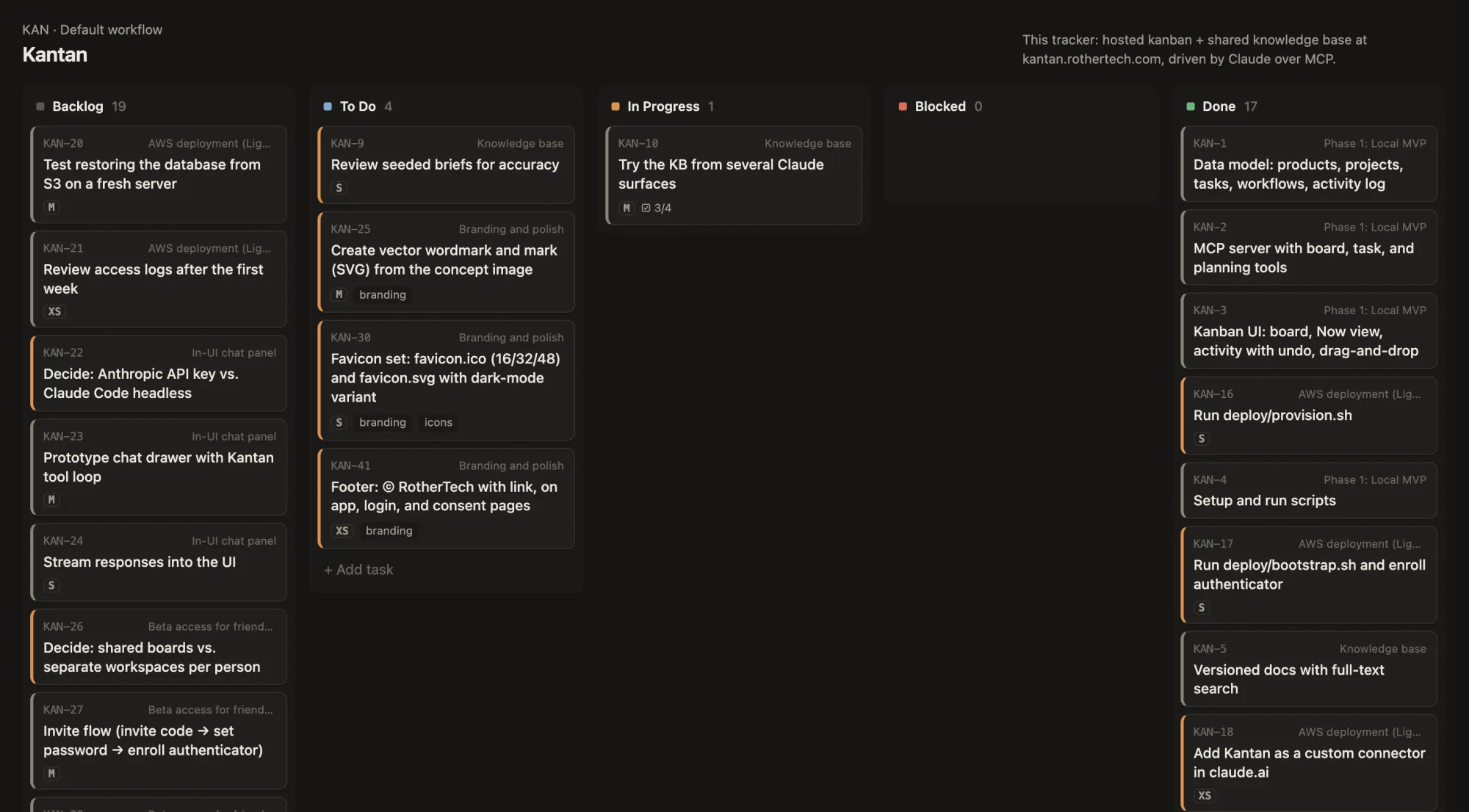
Agent first. The board is there so I can see the work. Most of the time I run it by talking to Claude.
One memory, every Claude. Any Claude on any device gets up to speed on a product with a single call, and each session leaves a handoff so the next one picks up where it stopped.
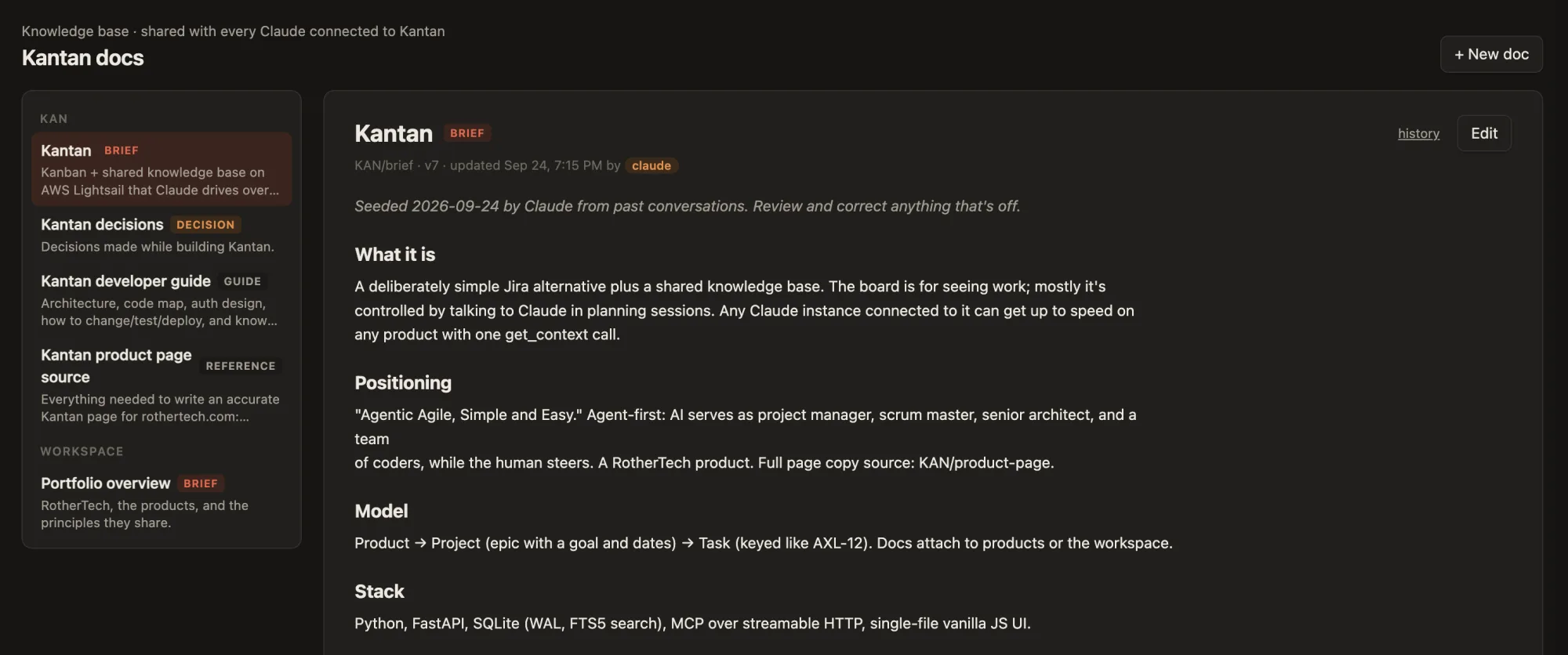
Knowledge lives in docs, not tickets. Briefs, specs and decision records are versioned, and Claude keeps them current.
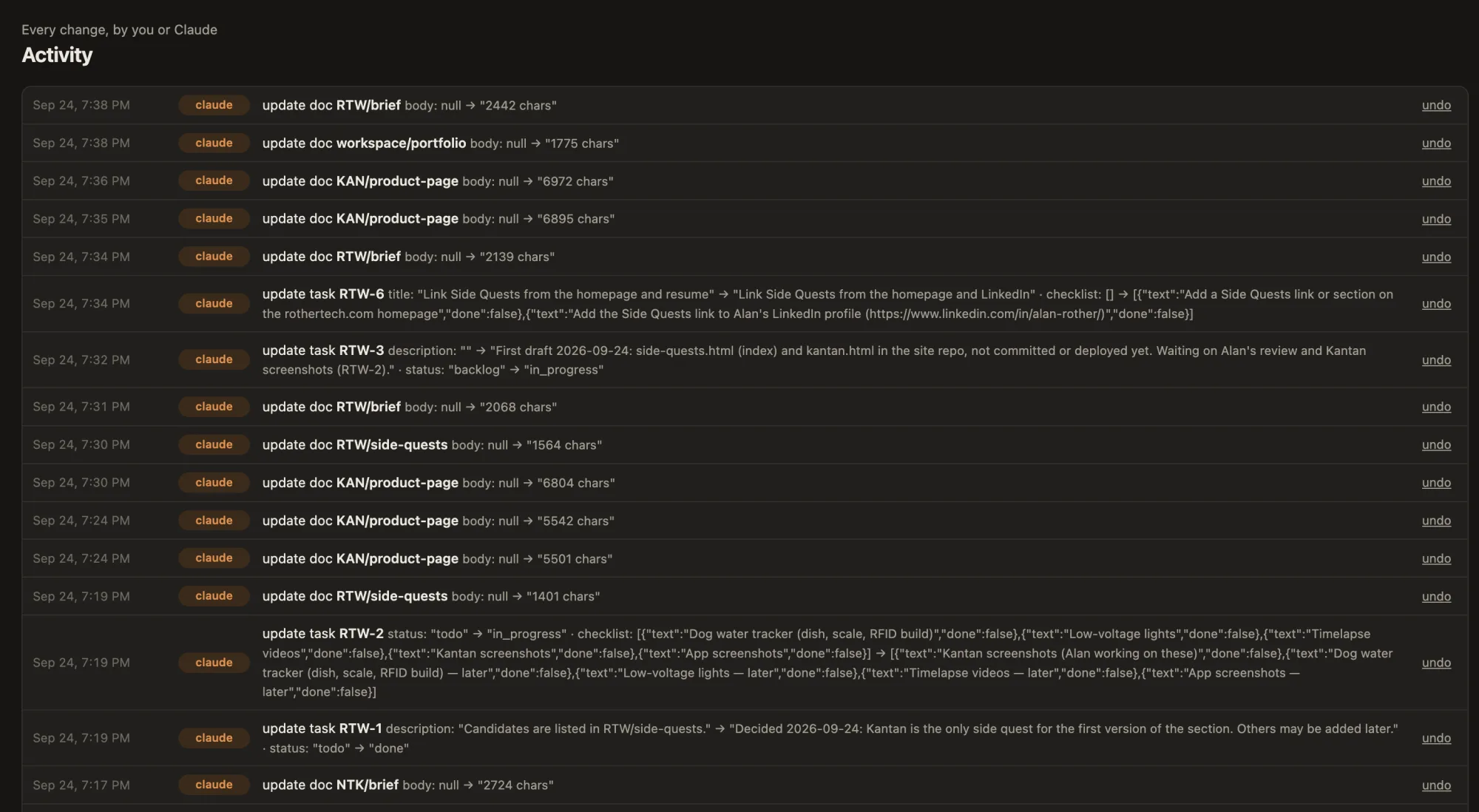
Everything can be undone. Every AI action is logged with who did it, and one click reverses it.
The AI wears the hats
The process overhead that makes big tools heavy is handled by Claude. I make the calls.
01
Project manager
Creates products, projects with goals and dates, and tasks. Tracks project health and reports progress.
02
Scrum master
"What should I work on tonight?" "What's blocked?" Moves tasks across the board and runs the weekly review.
03
Senior architect
Keeps each product's brief, specs and decision records up to date, so the reasoning survives the conversation.
04
The coders
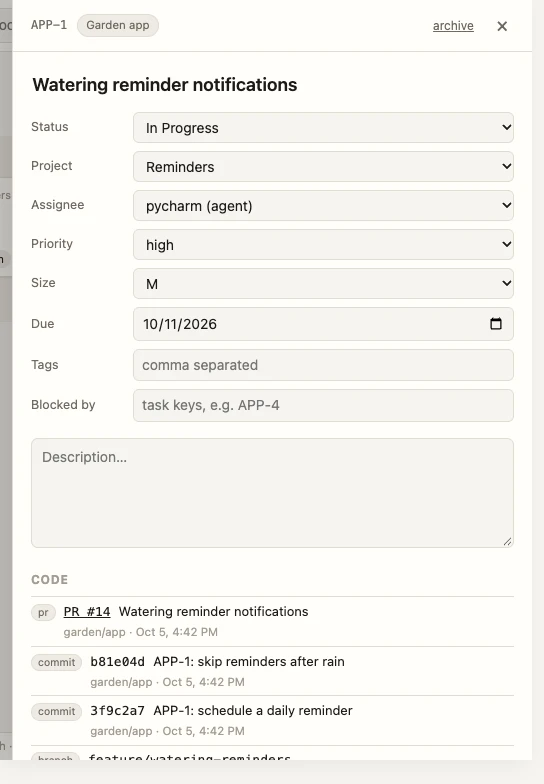
Claude agents in Xcode, Android Studio, PyCharm and WebStorm can take tasks from their own queue, work on a branch with a pull request for me to review, and link the code back to the task.
Things I actually say to it
“Brief me.”
“Planning session for Axel: the next release, two weeks.”
“What's at risk across everything?”
“What did we decide about backups for Ripple?”
“Archive the projects we've finished.”
“Wrap up.”
“Undo what you just did.”
In use
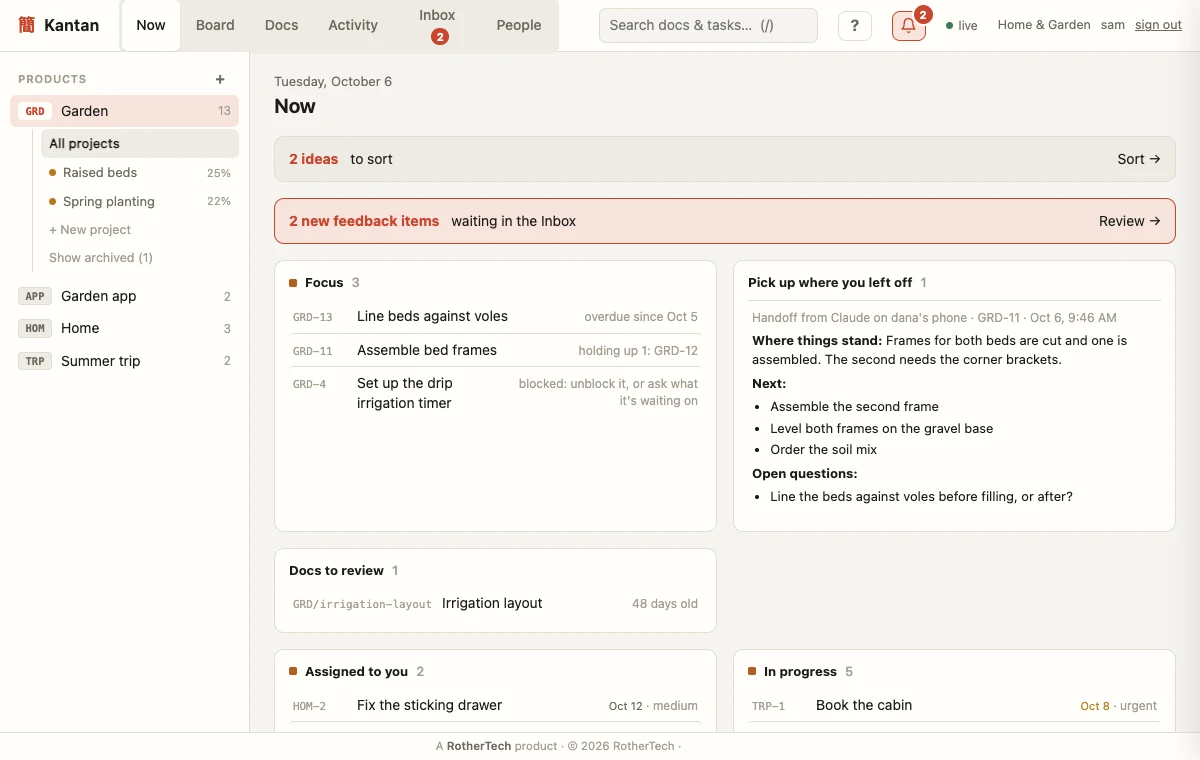
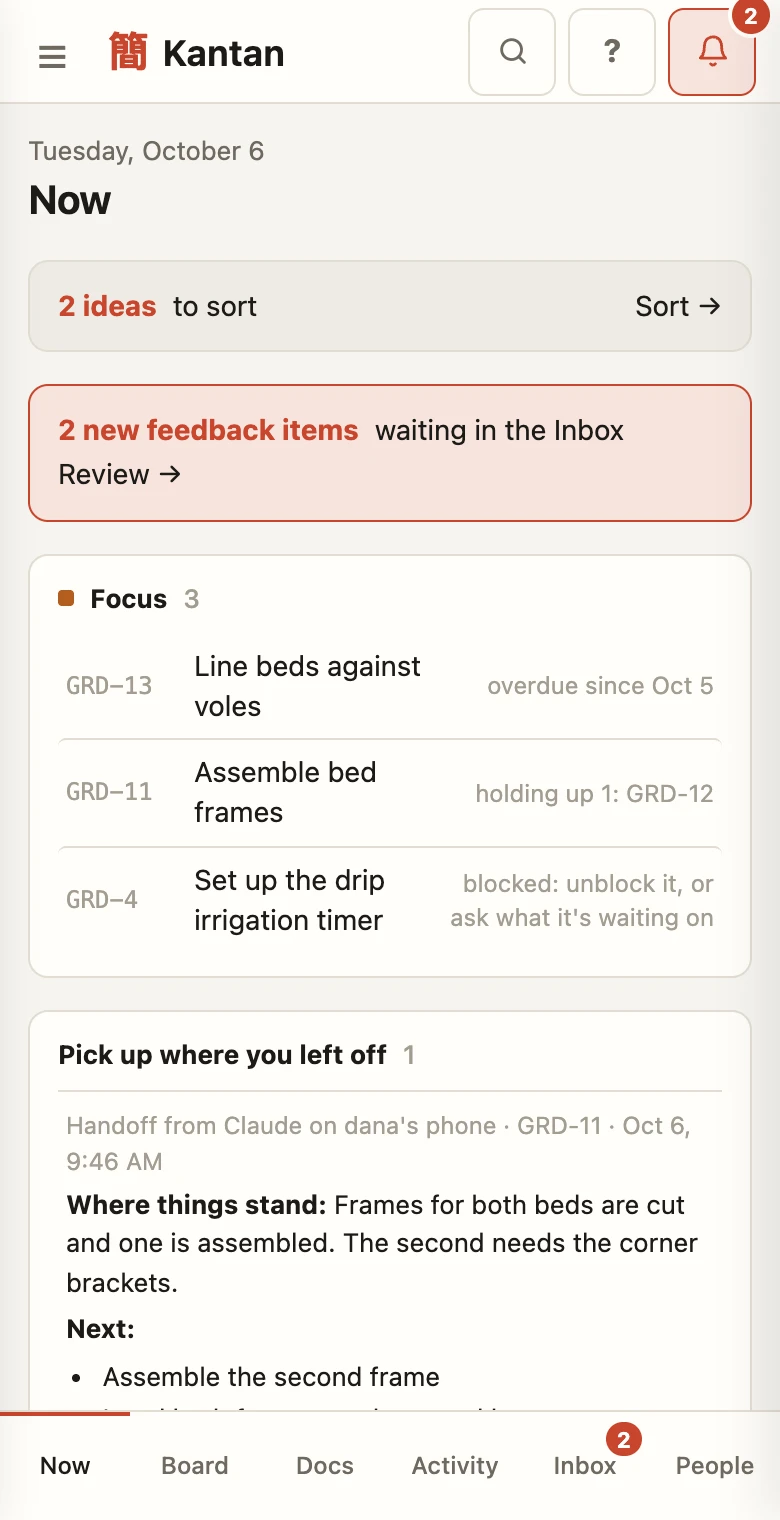
These are from a made-up demo workspace, a household planning its garden, rather than my own projects.
What it runs on
Kantan isn't built for scale, and it doesn't need to be. It's built for quick iteration and low cost, so I can develop it fast: one small server, one database file, no build step.
Like everything else here, it was built by one person, working with Claude.
App
Python and FastAPI. The whole web UI is a single file of vanilla JavaScript.
Data
SQLite, with full-text search across docs, notes and tasks. Nothing is ever hard-deleted.
AI interface
An MCP server with 43 tools, so Claude on the web, phone, desktop and in my IDEs can all use it.
Sign-in
Password plus authenticator code in the browser. OAuth with a consent screen for Claude apps.
Hosting
One small AWS Lightsail server, HTTPS only.
Backups
The database streams continuously to encrypted storage, so there's no nightly job to forget.
Recent updates
Kantan ships in small releases, sometimes several in a day. Newest first.
Oct 11
v2026.10.11
Design packs
Hand designs straight to the Claude that builds them. Keep a zip of design files with a product or task, and Claude Code can download and unpack the whole set in one step while Claude in the browser looks at its images. No more downloading and re-uploading between apps.
Oct 10
v2026.10.10
Repeating tasks
Tasks can now repeat: daily, weekly, monthly or on your own schedule. Finish one and the next is already waiting with its new due date, so chores and regular reviews look after themselves.
Oct 9
v2026.10.09 – .09.7
Safer connections, smoother updates
Kantan now connects only to Claude, and the approval screen shows exactly where a connection goes. Invite links stop working as soon as the person who made them loses access, and you’re signed out after three days away. Updates are smoother too: instead of errors you see a brief “Updating” note, and the page offers a reload once the new version is live.
Oct 7
v2026.10.07.2 – .07.3
Filter the activity log
Narrow the activity log by date, person, action, product or words in the change, or show only what Claude did. Any Claude can answer the same question, like “what did Claude change this week?” Searches are easier to leave, too.
Oct 5
v2026.10.05.9
Recovery codes
Ten one-time codes for a lost phone: sign in with your password and a code, then set up your authenticator again, with no reset link needed. Getting a new phone? You can switch authenticators yourself.
Oct 5
v2026.10.05.8
Claude agents, code links and quick capture
Named Claude agents, like the one in PyCharm, can be assigned tasks. Each picks up its queue at the start of a session and works on a branch with a pull request for review, never straight on main, and the commits and pull requests it makes show up on the task. “Add to Kantan: …” in any Claude saves an idea in one step. Due dates can also sync to Google, Apple or Outlook Calendar, and cards can be dragged on phones and tablets.
Oct 5
v2026.10.05.6 – .7
Claude sessions hand off, and a morning brief
When a Claude session wraps up, it leaves a short handoff on the task: where things stand, what’s next and what’s still open. The next Claude, on any device, reads it first. The Now page opens with a morning brief (“brief me” in any Claude gives the same): what to focus on and why, where the last session left off, and docs that may be out of date. Tasks can say what they’re waiting on, and cards that have sat for two weeks fade so stale work stands out.
Oct 5
v2026.10.05.3
Connecting Claude, step by step
A Welcome page walks through connecting Claude on the web, phone, terminal, JetBrains IDEs or Xcode, with copy-ready setup that ticks green the moment Claude connects. Claude tokens can be created and revoked from the browser, and Xcode setup is now a download and a double-click.
Oct 5
v2026.10.05.2
A built-in user guide
The ? in the top bar opens Kantan’s own guide: getting started, every feature, step-by-step setup for connecting Claude on the web, phone, terminal and IDEs, and what each role can do. It’s searchable, and every section has its own link.
Oct 5
v2026.10.05
Archive projects, and a real phone layout
Finished or shelved projects can be archived: they leave the board, the sidebar and Claude’s default view, but search still finds them and archiving can be undone. Kantan also has a proper phone layout now, with bottom tabs, a board you swipe one column at a time and full-screen tasks, instead of a zoomed-out desktop page.
Sep 28
v2026.09.28.5
Assign tasks
Assign a task to anyone in its workspace, from the task drawer or by asking Claude (“assign that to me”, “what’s assigned to me?”). Cards show who has each task, and the Now view starts with Assigned to you.
Sep 28
v2026.09.28.3 – .4
Built for more than one person
Private workspaces, roles (owner, admin, member and viewer) and one-time invite links that set up an authenticator on the spot. One permission check covers the browser and Claude alike, so a viewer’s Claude only gets read-only tools, and the activity log shows which person Claude was acting for.
Sep 28
v2026.09.28.2
Security checks on every release
Before every release, automated tests call every Claude tool and every API route with another workspace’s data, and push SQL injection attempts through every input. Nothing may leak or change.
Sep 26
v2026.09.26
Safe upgrades
Every upgrade takes a verified backup, copies it off the server, and checks that every row survived before the app starts again. Changes to the database are rehearsed on a copy of real data first.
Sep 25
v2026.09.25
Feedback inbox
Messages from this site’s feedback form land in a per-product inbox in Kantan, kept off the board and treated as untrusted text, with a notification when one arrives.
Sep 24
v2026.09.24
First release
Live at kantan.rothertech.com: the board and Now view, products, projects and tasks, the knowledge base with full-text search, undo for everything, and Claude connected from the web, phone, desktop and IDEs.
What's next
Planned
Chat inside Kantan
Talk to Claude in a panel next to the board and watch it change as you talk.
Planned
Proper branding
A finished 簡単 wordmark and icon set to replace the working look.
Planned
Friends-and-family beta
Letting a few people I trust use it, once it's safe to.
Curious how it works?
Kantan is still in development, and for now it's a tool I built for myself. If you're doing something similar with AI agents, I'm happy to talk about it.